
For many independent adjusters, spreadsheets have been the default way to track claims for years. Excel files become the central place for assignments, deadlines, notes, and status updates. At first, it works. A simple spreadsheet can handle a handful of files without much trouble.
But as the workload grows, especially during CAT season, the limitations start to show. Tabs multiply. Versions get shared back and forth. Deadlines are easy to miss. And suddenly the spreadsheet that once felt organized becomes another thing to manage. The transition from spreadsheets to automated claims tracking is about building a system that supports the way adjusting actually works today.
Below is a practical look at why many adjusters eventually move away from spreadsheets, and how to make that transition without disrupting your workflow.
Why Spreadsheets Become a Bottleneck
Spreadsheets are flexible, but they were never designed to manage a full claims lifecycle.
Adjusters often use them to track:
- File numbers and policy numbers
- Loss dates
- Assignment dates
- Deadlines for prelims, finals, and Proof of Loss
- Examiner notes or reminders
That works in the early stages. But as the number of active files grows, the spreadsheet becomes harder to rely on for day-to-day workflow.
A common example: an adjuster handling 30–40 files during a busy period may have one spreadsheet open, email threads running, and multiple folders on their computer. Updating the spreadsheet becomes a manual task that competes with actual adjusting work.
The problem is not the spreadsheet itself. The problem is that spreadsheets require constant manual updates. When things get busy, those updates are often the first thing to fall behind.
The Hidden Risks of Spreadsheet-Based Tracking
Beyond the inconvenience, spreadsheets introduce several operational risks that adjusters often overlook.
- Missed Deadlines
Deadlines for preliminary reports, final reports, and Proof of Loss submissions are critical. In a spreadsheet, those dates are simply static entries unless the adjuster actively checks them.
Without alerts or reminders, it’s easy for a deadline to sneak up—especially when new files are constantly being assigned.
2. Version Confusion
Spreadsheets are frequently shared between devices or emailed back and forth. Over time, multiple versions can exist at once.
It becomes difficult to know which version is current, especially if the spreadsheet is being accessed from a laptop in the field and a desktop at home.
3. Limited Visibility
Spreadsheets show rows and columns, but they do not show workflow.
An adjuster cannot instantly see:
- Which files are awaiting prelims
- Which finals are overdue
- Which files are ready for submission
Instead, they must scan the sheet manually.
4. Data Security Concerns
Claim files contain sensitive information. When spreadsheets are stored locally or emailed between devices, there is limited control over how that data is protected.
Automated systems are typically built with secure cloud infrastructure, permissions, and backup protocols that spreadsheets simply cannot provide.
How Automated Claims Tracking Changes the Workflow
The goal of automated claims tracking is not just to store information—it is to organize the entire claim lifecycle.
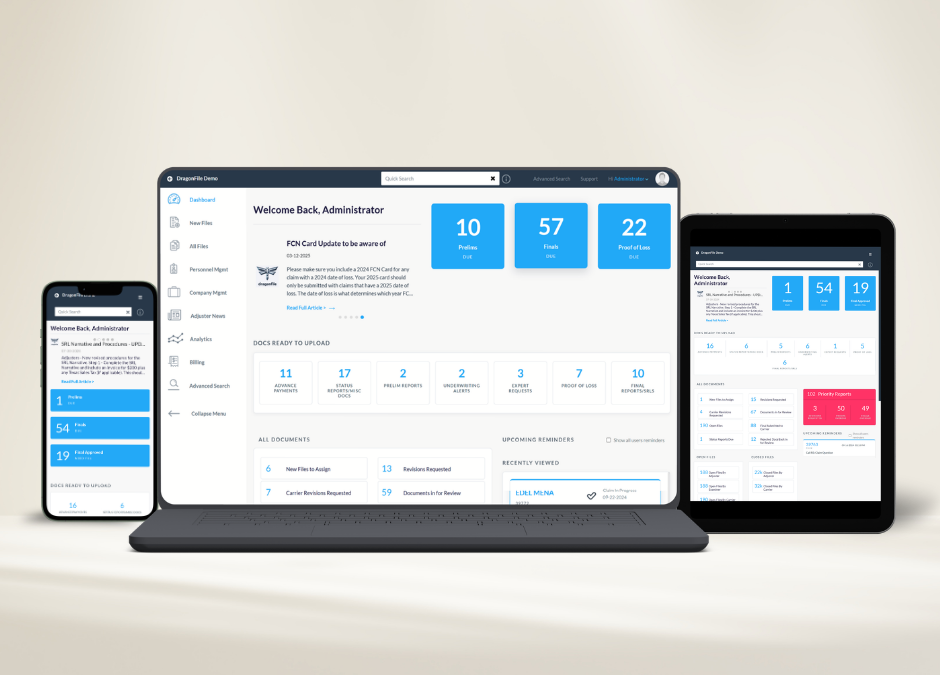
Instead of tracking claims through rows in a spreadsheet, the system organizes them by workflow stage.
For example:
- New assignments
- Preliminary reports due
- Final reports pending
- Proof of Loss required
- Files ready for submission
This allows adjusters to see their workload instantly. Instead of scanning a spreadsheet, they open a dashboard that shows exactly where each claim stands. Automation also introduces reminders and alerts, ensuring that important dates are not missed. For solo adjusters managing dozens of files, this shift alone can significantly reduce administrative stress.
Time Savings That Add Up
The biggest benefit adjusters notice after leaving spreadsheets behind is time.
Consider a common scenario: preparing documentation for a claim submission. When using spreadsheets, the adjuster often has to locate documents across multiple folders, check the spreadsheet for status updates, confirm deadlines, and verify that everything required is included. Automated claims tracking systems centralize these tasks.
Files, documents, deadlines, and notes all live in one place. Instead of searching through folders and spreadsheets, adjusters can focus on reviewing the claim itself. Over the course of a week, those saved minutes add up to hours that can be spent on inspections, reporting, or simply getting ahead of the next assignment.
Making the Transition Without Disrupting Your Workflow
One reason many adjusters stay with spreadsheets longer than they should is concern about switching systems. The idea of moving dozens of active files into a new platform can feel overwhelming.
In practice, the transition can be straightforward when approached step by step.
- Start with New Assignments
Rather than migrating every existing claim immediately, begin by tracking new assignments in the automated system. This allows the adjuster to learn the workflow without disrupting active files.
2. Organize Key Data Points
Most automated systems require the same information already present in spreadsheets: file number, policy number, loss date, and assignment details. Because the data structure is familiar, adjusters typically adapt quickly.
3. Gradually Retire the Spreadsheet
As new files move into the system and older claims close out, the spreadsheet becomes less relevant until it can be fully retired. This gradual transition avoids unnecessary disruption.
Why Many Adjusters Eventually Make the Switch
Adjusters who transition away from spreadsheets often say the same thing afterward: they did not realize how much time they were spending managing their tracking system. Spreadsheets require constant attention. Automated systems are designed to reduce it.
When the workflow is organized and deadlines are visible, adjusters can focus on what they were hired to do—evaluate damage, communicate with insureds, and deliver accurate reports. For independent adjusters working solo, that shift can make a noticeable difference in both productivity and peace of mind.
Final Thoughts
Spreadsheets have served adjusters well for a long time. They’re easy to start with, flexible, and familiar. But as claim volumes increase and workflows become more complex, spreadsheets begin to show their limits.
Automated claims tracking brings structure to the process. Instead of manually updating rows and checking dates, adjusters can see their entire workload at a glance, receive reminders for critical deadlines, and keep documents organized in one place. That kind of visibility can make a meaningful difference during busy periods, especially when managing dozens of active files.
This is exactly the gap tools like Dragonfile, a claims management and workflow platform built specifically for adjusters, were designed to solve. Rather than forcing adjusters to adapt to generic project management software or patch together spreadsheets, Dragonfile organizes the entire claim lifecycle—from assignment to preliminary report, final submission, and Proof of Loss tracking.
For independent adjusters and adjusting firms alike, that means fewer missed deadlines, better visibility across files, and a cleaner process for preparing carrier-ready submissions. With built-in reminders, file tracking, and document management designed around real adjusting workflows, systems like Dragonfile help reduce the administrative burden that spreadsheets often create.
In the end, the transition away from spreadsheets isn’t just about upgrading tools. It’s about building a workflow that keeps claims organized, deadlines visible, and adjusters focused on the work that actually matters—investigating losses and closing files efficiently.